By Matthew Herbert
Engagement is one of the greatest challenges in education. I’ve witnessed this first-hand as my wife and I have homeschooled our young daughter, who is autistic.
Over time, I started to see how visual, interactive formats helped maintain my daughter’s attention and reduce anxiety. That personal insight helped inspire the design of a free tool called Random Wheel Spin, which I created in my spare time.
It is a fully customizable wheel of names spinner with additional activities/actions that can be added beneath each name/entry. This tool offers a lightweight but powerful solution to the ever-present problem of student engagement.
Here, I’ll share how Random Wheel Spin works, what features it includes, and how it benefits learners of all ages, settings, and abilities—from kindergarteners to adults, neurotypical to neurodivergent learners, in classrooms and at home.
How It Works: A Two-Tiered Interaction
At its surface, the spinner selects entries at random—a name, question, topic, or prompt.
Beneath that, however, lies its unique feature: hidden content assigned to each entry. After the wheel lands, students can reveal that extra information, whether it’s an explanation, a discussion prompt, an extension task, or a follow-up question or activity. This two-tier interface transforms each spin into an interactive miniature lesson, rather than a passive choice.
Entries can include text, images, or both, as can the hidden information. All changes are saved locally in the browser—no server required—and long lists of entries can be bulk-imported using CSV or Google Sheets.
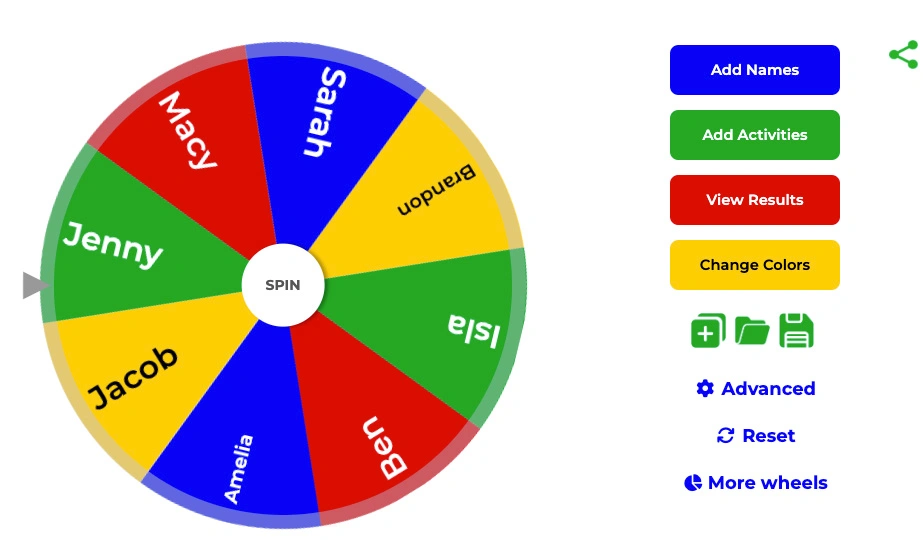
This tool supports visual customization, text-to-speech (the wheel can speak the results and hidden information out loud, supporting auditory engagement), and even generates code that allows wheels to be embedded on your own website or easily shared with students.
Hidden Features That Matter
Random Wheel Spin includes several additional features that support flexibility while preserving simplicity:
- An auto-remove option that allows you to exclude used entries to avoid repetition.
- Custom styling to adjust colours, backgrounds, spin speeds, and more.
- The ability to save all your customized wheels for re-use.
Benefits for Diverse Learners and Settings
In-class applications:
- Equitable Participation: Random selection reduces bias and student anxiety associated with being called on.
- Active Learning: Revealing hidden content engages retrieval practice, which is linked to improved memory.
- Differentiated Support: Teachers can attach hidden activities or actions—such as extra challenges, hints, or follow-up tasks—to individual entries. This enables one wheel to guide mixed-ability groups, keeping all students engaged at the right level during classroom learning.
Home, adult, and neurodiverse learning:
- Self-Paced Discovery: Learners at home can spin and reveal content independently, transforming drills into explorations.
- Neurodiverse-Friendly Format: The tool’s visual structure, predictability, and surprise can help learners with autism maintain focus and reduce overwhelm. Research suggests that visual supports are beneficial for many on the autism spectrum.
- Cross-Age Use: From kindergarteners to adult learners, this tool can adapt content depth while preserving the same interactive process.
Designed to Be Free and Customizable
A major barrier in educational technology is cost (or locked features). Random Wheel Spin is entirely free and fully customizable, with no accounts required. Every teacher, parent, or learner can adapt it to their subject, preference, and pace.
Evidence-Backed Design
- Multimedia Learning Effects: Mayer’s work shows that combining visuals and words with interactivity enhances retention beyond text alone.
- Gamification and Sustained Engagement: Meta-analysis finds that interactive gamification features help maintain user engagement.
- Visual Supports in Autism Education: Visual structure and predictable interactions are widely documented as effective supports for neurodiverse learners.
This research aligns with the tool’s layered design: choice, visual cues, interactive reveals, and scaffolded learning.
Getting Started: Integrating Hidden Activities Into Practice
Here are some suggestions for how to effectively incorporate Random Wheel Spin into your teaching.
- Start small: Build a quick wheel of 10 questions, each with a hidden activity.
- Blend it: Use the spinner episodically during lecture, review, or group tasks.
- Flip to home use: Share a wheel for students to spin at home for revision.
- Reflect and iterate: Ask learners how helpful the hidden content was, then adjust.
A basic spinner wheel is easy to understand, but adding hidden activities and actions can turn it into a useful learning opportunity for all types of students. While the concept is simple, its flexibility, accessibility, and interactivity make it a meaningful tool in many settings.
Try it out with your learners today at randomwheelspin.com.

Matthew Herbert is a full-time software architect based in the United Kingdom with over twenty years of experience designing and building software. Outside of work, he enjoys travelling to new countries with his wife and three children.